YouTube tips & tricks were the very first thing I searched for when I decided to start a channel, and within five minutes I felt completely overwhelmed. Cameras, algorithms, thumbnails, tags… where on earth do you begin? If that sounds like you, take a deep breath. I’ve been exactly where you are, and I’m going to walk you through the six things that made the biggest difference for me, in plain English and without the jargon.
The quick answer
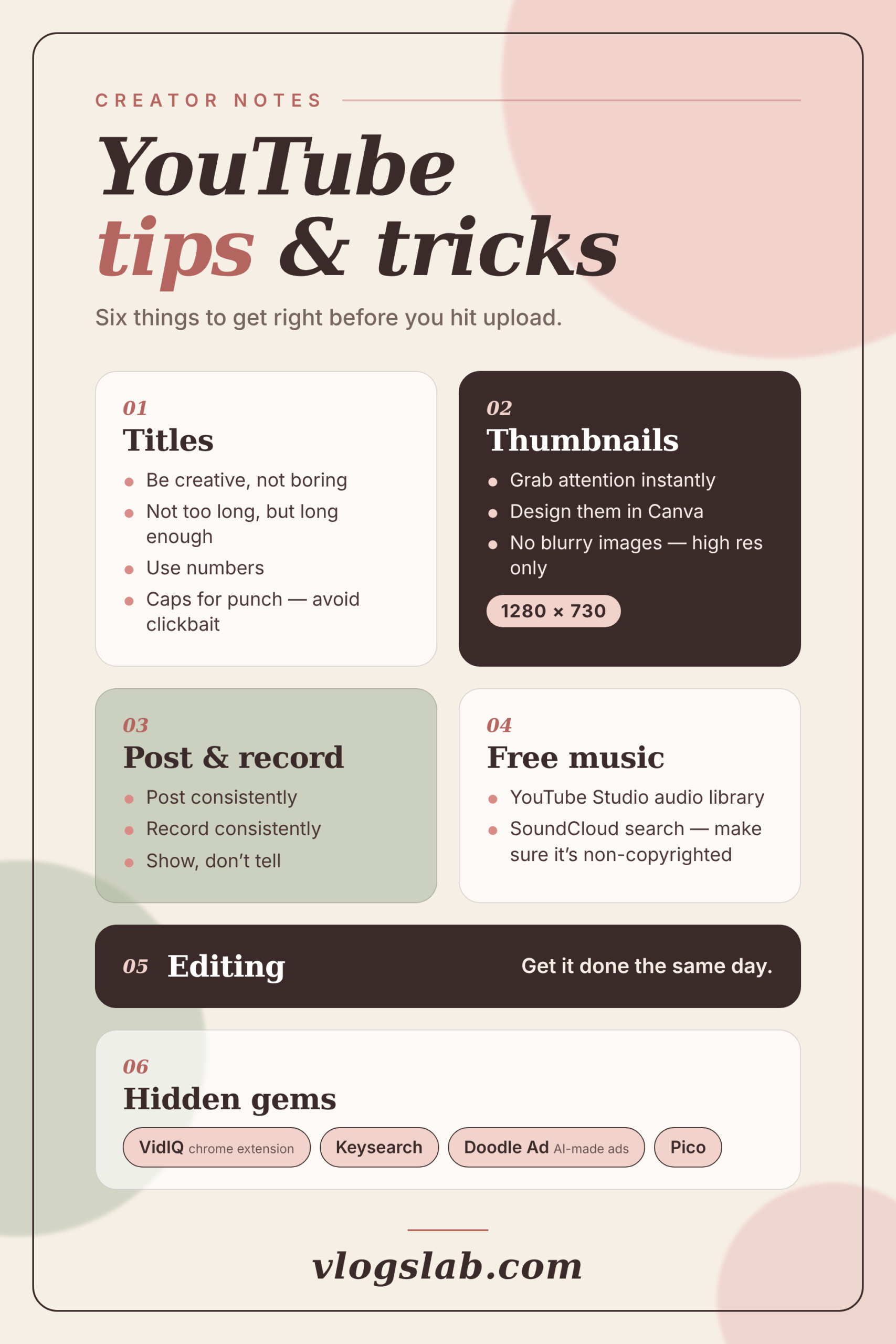
The best YouTube tips & tricks for new creators are refreshingly simple. Write curious titles, design bright and sharp thumbnails, post on a schedule you can keep, use music you’re allowed to use, edit while the footage is fresh, and let a few free tools do the boring work for you.
1. Write Titles That Make People Curious
Your title is the first thing a stranger sees, so it has to work hard. Think of it as a tiny sales pitch for your video. Boring titles get scrolled past. Creative ones get tapped.
- Be yourself. A title with personality tells people what your channel feels like, not just what the video covers.
- Keep it short, but not cryptic. Aim for around 60 characters so nothing gets chopped off on a phone, while still giving viewers enough detail to know what they’re getting.
- Add a number. “5 Easy Ways to Film Indoors” usually beats “How to Film Indoors,” because numbers promise something specific.
- Capitalise a word or two. A single CAPS word adds punch. A title that shouts from start to finish just feels desperate.
And please, skip the clickbait. If your title promises a miracle and your video delivers a shrug, people leave fast, and YouTube notices. Want to go deeper? My guide to optimising YouTube titles and thumbnails shows you how the two work as a team.
2. Design Thumbnails That Stop the Scroll
If the title is your pitch, the thumbnail is your shop window. It’s the little picture beside your video, and it decides whether someone taps or keeps scrolling. I make mine in Canva, a free design tool that runs in your browser, and I’ve never needed fancy skills. Pick a template, drop in your photo, add a few big words, and you’re done.
Size
1280 × 720 pixels, a wide 16:9 shape.
Look
Bright colours, one clear focus, big words.
Quality
Sharp and high resolution. Never blurry.
Blurry thumbnails look careless, and viewers judge in a split second. Export in high resolution, keep your text short enough to read on a tiny screen, and give the eye one obvious spot to land, like your face or a single object. Stuck for inspiration? My post on YouTube thumbnails that actually get clicks is full of ideas you can borrow.
3. Post and Record Consistently
Here’s something nobody told me early on: consistency beats perfection. Posting every week (or every two weeks, or whatever you can honestly stick to) teaches viewers when to expect you, and it keeps your skills sharp. Your tenth video will look so much better than your first. It’s hard for it not to.
Try recording in batches. Film two or three videos on one free afternoon, and you won’t panic when life gets busy. Then follow the golden rule of vlogging: show, don’t tell. Instead of announcing that your morning routine feels calm, film the sunlight, the kettle and the slow coffee pour. Let people feel it. Open every video with a strong first few seconds, too, and my YouTube video hooks will show you how. If you’re short on ideas, these YouTube vlog ideas will fill your calendar for weeks.
Done is better than perfect, especially for your first ten videos.
4. Find Free Music You’re Allowed to Use
Nothing deflates you faster than a copyright claim on a video you worked hard on. Luckily, the fix is easy. Open YouTube Studio, head to the Audio Library, and you’ll find thousands of free tracks and sound effects. You can filter by mood, genre and length, so it feels a bit like building a playlist.
SoundCloud can work too, but tread carefully. Search for tracks with a licence that allows reuse, such as Creative Commons, and read the small print. Some artists want a credit in your description, so copy it in. If you’re ever unsure, skip the song. There’s always another one waiting. Better still, save your favourite tracks in the library so you can find them again next time.
5. Edit It the Same Day
This one is simple, and honestly it’s my favourite. Edit your video the same day you film it. Why? Because you still remember everything. You know which take was your best, which joke landed, and exactly where you rambled. Leave the footage for a week and it turns into a mountain you dread climbing. Do it today, even if you only finish a rough cut. Trust me, future you will be grateful.
You don’t need pricey software to begin, either. Plenty of free vlogging software options do a lovely job, and your phone can handle more than you’d think. Filming on it? Read my guide on how to vlog with your phone first.
6. Lean on a Few Handy Tools
A few little helpers can save you hours. These are the gems on my own list:
- VidIQ: a Chrome extension that shows keyword ideas and video stats right on YouTube.
- Keysearch: a keyword research tool that reveals what people already type into the search bar.
- Doodle Ad: a tool that makes ads with AI, handy if you want to promote a video without hiring a designer.
- Pico: a newer one on my to-try list.
Tools won’t replace good ideas, though. They simply help you make smarter choices. Start with one, not all four, so you don’t drown in dashboards. Pair them with a basic grasp of search, and dodge the common YouTube SEO mistakes I see beginners make all the time.
Bonus: Don’t Forget Light and Sound
Here’s a bonus tip, because I can’t help myself. Viewers forgive a plain background, but they rarely forgive muffled audio. Sit facing a window for soft, flattering daylight, and film near it whenever you can. When the sun disappears, a small lamp does wonders, and my picks for the best lights for vlogging make an easy upgrade. Sound matters even more. A tiny clip-on mic costs less than a takeaway dinner and makes you sound instantly clearer, so I’ve rounded up the best wireless microphones for YouTube to save you the research. Prefer short clips? Try these YouTube Shorts strategies to reach new viewers quickly.
How Do You Start a YouTube Channel as a Total Beginner?
Start small. Pick a topic you could happily chat about for hours, grab your phone, and follow a simple checklist instead of buying everything first. Our YouTube channel setup checklist walks you through names, banners and settings step by step. Need a spark for your first video? Browse these YouTube content ideas, then read my vlogging tips for beginners before you press record.
Curious about earning money someday? Here’s how vloggers make money. Just give yourself time to enjoy the ride first. The income comes later. And please, don’t compare your first video with someone else’s hundredth. Everybody starts out awkward, and that awkward phase is where you learn the most.
YouTube Tips & Tricks: Your Quick Questions, Answered
How long should a YouTube title be?
Aim for around 60 characters so your title doesn’t get cut off on phones. Put the most important words first, add a number or a spark of curiosity, and make sure the title honestly matches the video.
What size should a YouTube thumbnail be?
Use 1280 × 720 pixels, which is a 16:9 shape. Keep the image sharp and high resolution, with big, simple text that you can read on a small phone screen.
How often should a beginner post on YouTube?
Pick a schedule you can truly keep, like one video a week. Consistency matters more than speed, because regular posting teaches viewers when to come back.
Is it safe to use SoundCloud music in my YouTube videos?
Only if the track’s licence allows it. Look for Creative Commons or similar licences, follow any credit rules, and when you’re unsure, use the YouTube Audio Library instead.
Do I need an expensive camera to start a YouTube channel?
No. A modern phone is plenty to begin with. Good light and clear sound matter far more than the camera itself, so upgrade later, once you know what you enjoy filming.
Your Turn: Hit Record
That’s my full list of YouTube tips & tricks, and I promise none of it needs a fancy setup. Pick just one thing to try today. Write a bolder title, edit tonight’s clip, or open the Audio Library and find your sound. Then come back and tell me how it went. You’ve got this, and I can’t wait to watch your first upload.